
Marketing

Webflow vs. WordPress: The Ultimate Comparison for Marketing Websites (2026)

6
min.
28.11.2025
WordPress versus Webflow
Webflow wird häufig mit WordPress verglichen. Welches System das bessere ist, hängt von den individuellen Anforderungen ab.

Webflow and WordPress are the two dominant platforms companies use today to build and scale professional websites. Both systems have their validity but follow radically different philosophies. This is exactly why the comparison Webflow vs. WordPress is so intriguing for marketing executives, founders, and CMOs.

For classic business websites, the situation today is different than it was five years ago. The site is no longer a static digital storefront. It is an active growth lever. It needs to generate leads, explain complex products, build trust, and carry campaigns.

To achieve this, it must be constantly adapted. If a Content Management System (CMS) slows you down, your entire marketing loses speed.

That is why the question of Webflow vs. WordPress involves far more than just technical curiosity. It is a fundamental business decision. You want to know which CMS is faster in the daily agency or in-house routine. Which system remains stable when new requirements arise?

And which website project doesn't force you permanently into annoying maintenance issues? For business sites with an attached content hub, this point is particularly important because many page types converge here.

Why the Webflow vs. WordPress Comparison is Relevant Right Now

The Typical Scenario: A Relaunch Because the Team Needs to Move Faster

In practice, the discussion often begins with a pain point. The existing website has grown organically over the years. Pages were added, content restructured, new product lines introduced. Eventually, the structure no longer feels coherent. Texts are hard to maintain in the backend, pages no longer look consistent, and every small change to the design feels tedious.

Then comes the moment for a new website project. A new positioning, a new pricing model, or a major feature update is pending. Suddenly, the marketing team needs to deliver faster. You need new solution pages, landing pages for campaigns, and fresh case stories. This is not a one-time project you "tick off," but an ongoing process.

Here, the CMS decides whether you are capable of acting. With WordPress, speed is possible. But often only if the setup, theme, and various extensions play together absolutely perfectly. Otherwise, with WordPress, a queue quickly forms towards the IT department.

A modern website builder like Webflow, on the other hand, is built so that marketing and design people can implement daily changes directly without relying on developers every time. It is precisely in this everyday situation that the choice between WordPress vs. Webflow is made.

What is Meant by "Business Website plus Content Hub"

Sitemap of a business website like for service providers or SaaS
Typical Sitemap of a Business Website

To make the comparison fair, we must define what we are talking about. We are not talking about private blogs, nor are we talking about e-commerce giants. We are talking about the typical business website.

This consists of the classic corporate pages: Home, Product Pages, Pricing, Contact. These pages are structurally stable but essentially constantly in flux. Messaging, visuals, and claims are continuously optimized.

In addition, there is almost always a content hub today. Blog, use cases, case stories, resources, or events. The hub delivers SEO traffic, supports sales conversations, and feeds campaigns. The crucial factor is the integration.

A blog post must contribute to product pages. A case story ideally appears filtered on multiple solution pages. Your Content Management System must be able to do both: Static pages with high design standards (visual design) and a CMS that models data cleanly. This is exactly where Webflow vs. WordPress becomes practically relevant.

Personal Context: 15 Years of Experience, First WordPress, Today Webflow

I have been building business websites for around 15 years. For many years, I did this exclusively with WordPress. I developed custom themes and put a lot of manual work into the code.

Today, I use Webflow almost exclusively for business sites (here is the link to my Webflow Agency). Not because WordPress suddenly became "wrong." But because the requirements of marketing websites have changed massively. The speed at which teams need to act today often no longer aligns with the maintenance cycles and plugin dependency of WordPress. The Webflow vs. WordPress comparison now clearly favors the integrated platform in many B2B scenarios.

Webflow vs. WordPress: Who Wins in Which Scenario?

Both CMSs have their strengths in different areas. There is no blanket winner, only the right tool for your specific website project.

If you run a classic business website with a content hub, Webflow wins in most cases. The builder is fast in everyday use, keeps the design consistent, and, unlike WordPress, reduces maintenance effort to a minimum.

This is ideal if your marketing team wants to continuously optimize pages or roll out campaigns and remain independent while doing so.
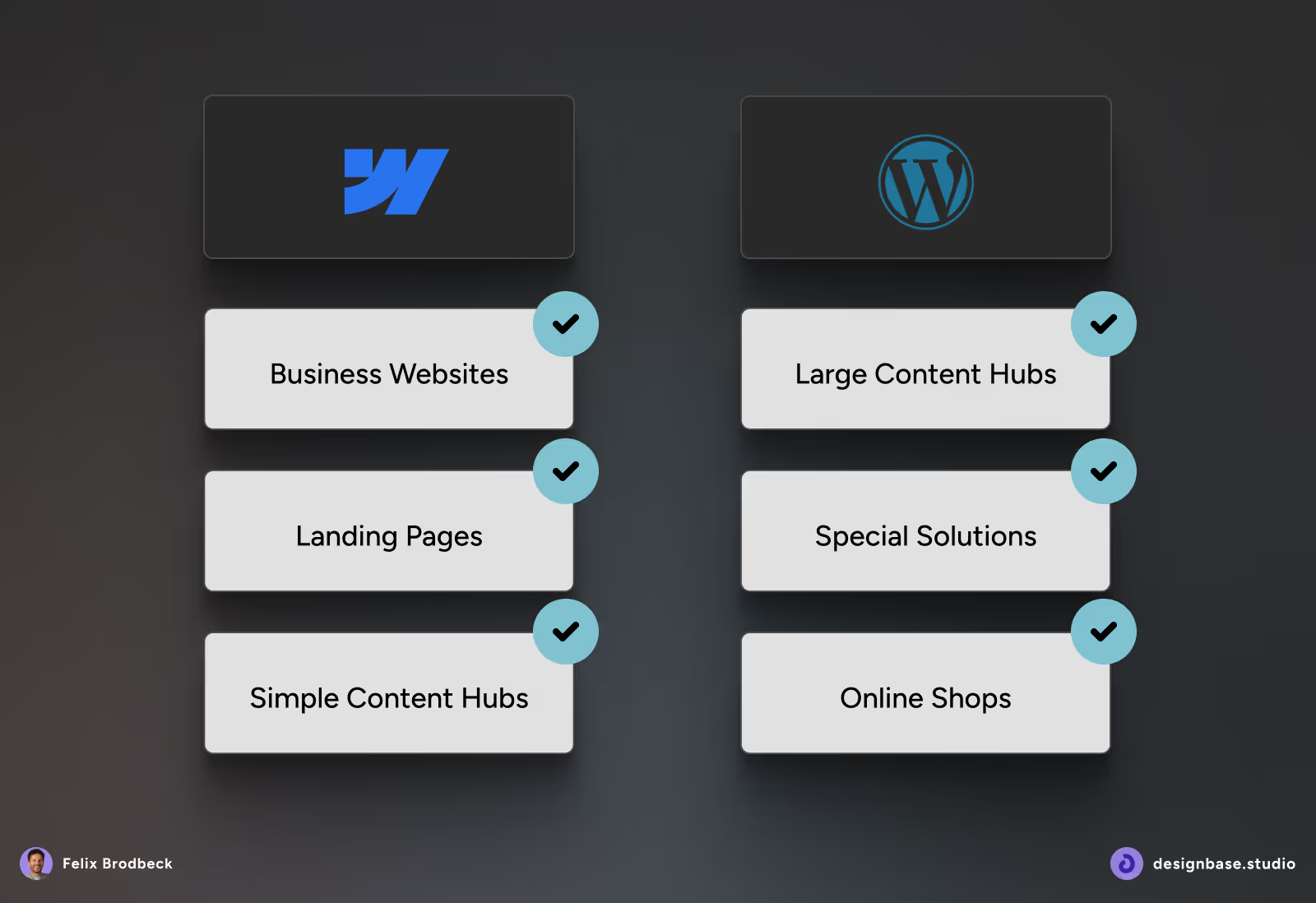
Comparison table showing which website types suit Webflow or WordPress
Both CMSs have their strengths in certain areas.

WordPress, on the other hand, has a clear advantage if your project is extremely "content-first" or becomes extremely large. We are talking about huge archives, complex taxonomies, or community platforms with user logins. Even if a complex online shop is the core of the site, WordPress is often the more flexible choice. For such projects, the huge cosmos of plugins is a real trump card that Webflow cannot offer in the same way.

The Strengths of the Two Systems Compared

WordPress: The Power of the Ecosystem

WordPress is an open-source CMS. That means: The core code of the software belongs to no one. You host it yourself or via a provider. The system scores with maximum extensibility.

  • Open-source CMS with a huge worldwide ecosystem.
  • Extremely flexible thanks to thousands of free and paid plugins.
  • Ideal for very large content hubs, complex structures, or member areas.
  • Hosting, security, and updates are your responsibility (or your agency's).
  • Can be very fast, but requires a clean technical setup and a lot of discipline in maintenance.

Webflow: The Power of Integration

Webflow offers high speed in everyday life, strong layout control, and very little operational overhead.

  • Visual website builder with integrated CMS and hosting (SaaS).
  • Design- and component-first approach. Very high layout control without the limitations of rigid themes.
  • Ideal for business websites, landing pages, and agile marketing teams.
  • Managed security, automatic backups, and updates. Very little maintenance effort.
  • Clean code output (HTML, CSS, JS). Good performance and Core Web Vitals are often easier to achieve.
This is what the Design Mode looks like in Webflow, where you can implement everything possible with HTML, CSS, and Javascript.

Software and User Interface: How Do You Really Work With It?

One of the biggest differences in the Webflow vs. WordPress duel is the daily working feel. What does the software feel like when you spend eight hours a day in it?

Webflow: Visual Coding in the Browser

Webflow is a visual website builder. But that doesn't mean it's a simple "construction kit." The UI (the "Designer") is a visual representation of code. When you drag a container on the left and set the margin to 20px on the right, Webflow writes clean CSS in the background. You see immediately what happens.

The system thinks strongly in components, classes, and reusability. For business sites, this means: You build a design system (style guide) directly in the website and roll it out modularly. The interface is reminiscent of professional design tools like Figma. Designers feel at home here immediately because they have full control.

WordPress: Separation of Backend and Frontend

WordPress traditionally separates strictly between administration (Dashboard) and view (Website). You enter content into forms, click on "Preview," and hope it looks good. With various page builders like Elementor or Divi (third-party extensions for WordPress), this has come closer, but the logic often remains separate.

The user interface of WordPress often looks simpler at first glance because it has fewer buttons. But as soon as you want to build complex layouts, you often have to jump back and forth between different views, theme options, and settings of plugins in WordPress. This can slow down the workflow.

This is what the Elementor Page Builder looks like (third-party extension)

Author

Ein Portrait von Felix Brodbeck

Felix Brodbeck

Felix Brodbeck is the founder of Designbase GmbH, UI designer and Webflow developer. He regularly shares his content on LinkedIn, YouTube, and this blog.

Felix Brodbeck, Webflow-Entwickler, Designer und Gründer der Designbase GmbH

Felix Brodbeck

Founder @ Designbase

Your Chance

Your Certified Webflow Premium Partner

  • Unique and scalable UI design
  • Professional Webflow development
  • Reliable, long-term support

The Big Topic: Plugins and Extensions

Here lies perhaps the most important difference for your website project. WordPress lives on plugins. Webflow tries to make them superfluous. Surfer SEO shows that the topic of plugins is central to the comparison – and rightly so.

The "Plugin Zoo" in WordPress

List of frequently used plugins on WordPress sites

List of frequently used plugins on WordPress sites

To run a modern business website in WordPress, you almost mandatorily need a whole stack of extensions.

A typical plugin stack looks like this:

  • SEO (e.g., Yoast or RankMath) to maintain meta data.
  • Caching (e.g., WP Rocket) so the page loads quickly.
  • Security (e.g., Wordfence) to fend off hackers.
  • Image optimization (e.g., Smush) to suppress load times.
  • Forms (e.g., Gravity Forms).
  • Backups (e.g., UpdraftPlus).
  • And often a Page Builder (Elementor, Divi), which in turn brings its own add-ons.

The problem: Each of these extensions is written by a different developer. Each brings its own code, its own JavaScript, its own CSS. This bloats the site. And worse: If extension A updates, extension B might stop working. So you have to constantly test and maintain.

The "All-in-One" Approach of Webflow

Webflow takes a different path. Most functions for which you need plugins in WordPress are part of the core software here.

  • SEO: Meta tags, Open Graph, 301 redirects, and sitemaps are natively integrated into the UI. No extension needed.
  • Security: SSL, DDoS protection, and backups are included. No Wordfence needed.
  • Performance: Hosting runs via AWS, including CDN (Content Delivery Network). No caching plugin needed.
  • Design: Animations, Webflow Sliders, tabs, and lightboxes are native elements. No design add-ons needed.

This means for your website project: You have drastically fewer dependencies. Your website consists of clean HTML and CSS, not a shaky tower of third-party code. This makes the site more stable and secure.

Role Distribution in the Team: Who Does What?

A CMS is always only as good as the team that operates it. How does work change in Webflow vs. WordPress?

Webflow has better roles and rights by default. In WordPress, they are easy to extend with plugins.

The Marketing Team

In marketing, you want autonomy. In Webflow, you can build landing pages, change texts, and even assemble new sections from existing components without calling a developer.

The "Editor" interface of Webflow allows copywriters to write directly on the live site without being able to break the layout.

In WordPress, this freedom depends heavily on how well the WordPress theme and plugins are configured. Marketers often don't dare to touch layouts in WordPress for fear of breaking something.

The Design Team

Designers love Webflow. They can implement their vision pixel-perfectly. There are no "theme boundaries." If the designer wants an animation, they build it in the Interaction Panel. In the WordPress world, designers often have to hand their layouts over to developers who then rebuild them in the theme in WordPress. The subtlety of the design is often lost in the process.

The Developers / IT

Developers on WordPress are often busy with maintenance: installing updates, resolving conflicts between plugins, updating PHP versions. With Webflow, the role of the developer shifts. They don't have to maintain servers. Instead, they can concentrate on cool custom code (JavaScript) to build special calculators, filters, or interfaces.

Design and Brand Consistency

For business websites, design is a massive trust signal. If the site looks inconsistent, conversions suffer. That is why this section is so important in the Webflow vs. WordPress comparison.

Webflow: Design System and Components

Screenshot from the Webflow Designer focusing on Webflow Components

Here you build your design system directly on the website. Typo scales, spacing rules, color tokens, components, and states. Unlike WordPress, you are not bound by theme limits. If you need a new section, you build it exactly as it fits the brand.

Webflow almost automatically forces you into modular building blocks. You build a section, save it as a symbol (Component), and use it everywhere. If you change the building block, the changes apply across all pages.

WordPress: Themes and Page Builders

Screenshot of WordPress Gutenberg
WordPress is mostly used in combination with page builders like Elementor, Divi, or ACF. The image shows the rather rudimentary (but extensible) Gutenberg Page Builder from WordPress itself.

WordPress is used today mostly in combination with page builders. With a very good custom theme, WordPress is extremely strong. The catch is: Many companies use ready-made themes plus builders plus dozens of plugins. That works well at first, but it creates technical baggage ("Technical Debt") over time.

Every special case gets an extra plugin. Every plugin brings new settings and new dependencies. This increases maintenance and security costs. In large projects, this is often the reason for later pain: No one dares to delete plugins anymore because the dependencies are unclear.

Content Hubs and CMS Structures

The content hub is usually the SEO engine of a website. So it must run smoothly.

Screenshot of categories and tags in Webflow and WordPress
In Webflow, you can create as many collections for categories and tags as you like. In WordPress, you can also create any number of subcategories.

Mapping Content Types Cleanly

Webflow works with CMS Collections. Blog posts are one collection, case studies another. You link these databases visually. This is ideal for typical business hubs. You can determine: "Show only the three newest blog posts from the category 'Finance' on the product page 'Finance'." Such logic is clicked together in Webflow in minutes.

In this post, you will find more details about the Webflow CMS.

WordPress uses "Post Types" and taxonomies. This is even more powerful at its core, especially if you need complex filters, nested archives, or many content relationships. For large publisher setups, this is unbeatable. To make this power usable, however, you often need specialized plugins in WordPress like "Advanced Custom Fields" (ACF) and have to work on the theme code.

SEO and Performance: A Technical View

SEO is not a single function, but an interplay of technology, content, and process. Is Webflow good for SEO? Absolutely. Many SEO experts now even prefer it over bloated WordPress installations.

Technical SEO: Code and Core Web Vitals

Webflow generates lean code without theme bloat. The platform delivers via a global CDN and handles image optimization automatically. This makes good Core Web Vitals (load time, stability) often easier to achieve than with WordPress, where you often have to fight against slow-loading extensions.

SEO Workflows in Daily Business

If marketing wants to optimize quickly, Webflow is usually at an advantage over WordPress. You can control URL structures, meta data, and redirects directly in the system without having to install a plugin like Yoast.

Webflow also introduced AI-supported SEO functions in 2025. In the Audit Panel, you get hints about missing alt texts or incorrect heading structures. This speeds up quality assurance.

WordPress is more flexible for "Special SEO." Complex schema logic or multisite internationalization are sometimes easier to achieve there through extensions or code.

Security, Maintenance, and Risk Profile

Here I see the biggest gap in the business context and a main point in the Webflow vs. WordPress comparison.

Webflow handles hosting, SSL, CDN, and updates automatically as a SaaS provider. There is no plugin chain that you have to test after every update. This dramatically reduces the risk of downtime.

WordPress is secure – but only if it is well maintained. You have to maintain it actively. Core updates, theme updates, plugin updates, PHP updates, backups, and monitoring are mandatory.

If you do this consistently, WordPress is not a security problem. If you let it slide, it quickly becomes a gateway for malware. An update that breaks a contact form is not a tech problem, but a revenue problem.

Migration Process: Your Next Website Project

Many companies face the question: "Should I switch from WordPress to Webflow?" A switch is standard today and well plannable. A typical website project for migration runs in the following phases:

Phase 1: Audit and Cleanup

First, you look at the old site. Which content and extensions are really being used? Often you find that you have installed 30 plugins but only really need 5 functions. The rest can go.

Phase 2: Visual Development

The new design is implemented in the Webflow Designer. Unlike WordPress, you don't have to translate a static mockup into PHP theme files first. The designer builds directly what goes live later. This speeds up feedback loops in the team enormously.

Phase 3: Content Migration and Redirects

Content can be exported from WordPress via CSV and imported into Webflow. Mapping the fields is simple. The most important step here is the 301 redirects. Since URL structures might change, it must be ensured that old Google rankings are forwarded to the new pages. Webflow has a native redirect management tool for this.

Phase 4: Training and Go-Live

The marketing team is trained on the new UI (the Webflow Editor). Usually, this takes only 30 to 60 minutes because the system is very intuitive ("What you see is what you get"). After that, the domain is switched to the Webflow servers.

Costs and Total Cost of Ownership

For WordPress costs, I assume you use the premium version of all plugins. In many cases, there are also limited free packages or free alternatives. However, decisions are very individual and depend on the situation, budget, and setup.
Costs for WordPress depend heavily on the individual setup. Here I assume that the premium version is used for all plugins. However, there are also many free alternatives. These often have disadvantages regarding support, updates, and security.

Costs are rarely just license costs. It's about the total effort over the years.

Webflow costs a monthly or annual fee. Hosting, CMS functions, and user licenses are clearly priced. It looks more expensive at first glance than "free" WordPress. But in return, many things are included that you have to buy externally or pay for through working hours with WordPress.

WordPress itself is free. But hosting, premium themes, licenses for premium plugins (many cost €50-200 per year), and above all maintenance cost money. If you calculate the working hours your team or your agency spends on updates, backups, and troubleshooting, WordPress is often more expensive than the Webflow license.

For typical business sizes, Webflow is often more efficient because "system maintenance" is already priced in. WordPress can be cheaper if you have a very lean setup, rely on free plugins, and do maintenance internally "on the side" – but that is risky.

Disadvantages of Webflow: Where Does the Shoe Pinch?

To be honest: Webflow is not right for everyone. Where are the disadvantages compared to WordPress?

  • Learning Curve: The user interface is more complex than a construction kit. Coding knowledge is a strong advantage when using the Webflow Designer.
  • Limits: Webflow has hard limits on the number of CMS items (currently up to 20,000 depending on the plan). For huge databases, this is too little.
  • Vendor Lock-in: You can export your website, but the CMS and Webflow Forms only work on Webflow hosting. You bind yourself to the provider.
  • E-Commerce: Webflow E-Commerce is solid for small shops but not comparable to the power of WooCommerce (WordPress Plugin) or Shopify.
Screenshot of CMS and bandwidth limits in Webflow
Webflow has certain CMS limits relevant to business websites. In reality, however, business websites rarely come close to these limits.

Conclusion: Webflow vs. WordPress for Marketing Organizations

The decision Webflow vs. WordPress is not a question of faith, but a business decision.

For the typical B2B marketing website with a content hub, I see Webflow ahead today. The builder enables fast changes, keeps the brand clean, and drastically reduces operational overhead. That is exactly where many companies lose valuable time in WordPress setups.

WordPress remains an excellent Content Management System for very large content projects, complex member portals, or shops that need maximum flexibility in the backend. It is the generalist with the huge ecosystem of plugins. Therefore, Webflow vs. WordPress is not a holy war. It is a question of the real requirements of your website project.

Frequently Asked Questions about Webflow vs. WordPress

Is Webflow better than WordPress for SEO?

Screenshot of a schema markup in Webflow
In Webflow, schema markups can be filled with AI support.

For typical business SEO, Webflow is at least equivalent, often even better due to the clean technical basis. Clean code, fast load times via AWS hosting, and native SEO tools help with ranking. WordPress only has advantages if you need very large hubs or extremely special SEO logic that requires special plugins.

Can I build a real blog with Webflow?

Yes, absolutely. For business hubs, the CMS is absolutely sufficient. You can model categories, authors, tags, and templates cleanly. The limitations only apply to extremely large publisher sites.

Should I switch from WordPress to Webflow?

If your team is annoyed by updates, slow load times, or dependency on developers: Yes. A switch makes marketing more agile. However, if you are deep into special WordPress plugins (e.g., a complex booking tool that only exists for WP), a switch might be too involved.

What is cheaper over 3 to 5 years?

Webflow is plannable and saves massive maintenance time. WordPress looks cheaper at first, but hidden costs for premium plugins, hosting, and maintenance add up. For most agencies and SMEs, Webflow is more efficient calculated over the term.

Which platform is more secure?

Webflow is safer in everyday life because it is a closed system and updates are managed centrally. WordPress is secure if you actively update and secure it – but that is exactly what is often forgotten in practice.