Squarespace is better for launching a polished website quickly, while Webflow is better for businesses that need more control, stronger content structure, and room to grow.
Choosing between Squarespace and Webflow is ultimately a decision about your website's time horizon. Squarespace makes it easy to get a simple site live with minimal setup, while Webflow requires more upfront planning in exchange for greater control over design, CMS structure, SEO, and performance.
This comparison looks at Squarespace vs Webflow pricing, SEO, design flexibility, performance, ecommerce, and scalability in 2026. It uses current platform information and independent benchmarking to help you choose the option that fits your business, not just the platform that is easiest to launch.
Why Should You Compare Squarespace and Webflow Using Data?
The useful difference between Squarespace and Webflow is not simply that one is easier and the other is more powerful - it's how each platform performs after launch.
Most comparisons stop at templates and editing interfaces. A better decision also considers recurring costs, SEO controls, technical performance, internal linking, content management, and how difficult the website will be to change as the business grows.
What Do Squarespace and Webflow Offer Marketing Teams?
Squarespace gives marketing teams a guided way to publish a polished website, while Webflow gives them more control over the structure and design of the site.
Squarespace is built around templates, sections, and blocks, which makes it fast to launch and easy to manage. Webflow provides a visual canvas with greater control over grids, breakpoints, CMS collections, interactions, and page-level SEO settings.
That additional control creates more work at the beginning, but it becomes valuable when a team needs to publish more pages, launch campaigns, manage structured content, or update the website without rebuilding the entire design.
Which Platform Is Easier to Use?
Squarespace is easier for beginners because its guided editor removes much of the technical decision-making involved in building a website.
Webflow has a steeper learning curve because it exposes more of the underlying layout system, including containers, grids, flexbox, breakpoints, classes, and CMS relationships. Once the initial structure is set up, however, Webflow can give marketing teams more control over future changes.
For a small website that needs to go live quickly, Squarespace is usually the more efficient choice. For a site that will support ongoing campaigns, content publishing, or complex design requirements, Webflow's additional complexity may be worth it.
The practical difference: Squarespace optimizes for the first six months, Webflow optimizes for the next years.
Which Platform Is Cheaper in 2026?
Squarespace and Webflow can look similarly priced at entry level, but the cheaper option depends on the features, usage, and growth requirements of the website.
Webflow offers a free Starter option for building and testing, while paid site plans unlock features like custom domains and hosting. Squarespace doesn't offer the same type of permanently usable free website plan, although its paid plans bundle more features into a single platform. Current public pricing shows that Webflow and Squarespace plans vary depending on billing frequency and the plan structure selected.
The advertised subscription price is only one part of the calculation. CMS limits, ecommerce transaction fees, contributor access, form submissions, bandwidth, scheduling, email marketing, and other add-ons can change the total cost substantially. A cost analysis of both platforms in 2026 found Webflow’s true monthly cost, once CMS item overages, form submission limits, and bandwidth charges are factored in, averages around $74/month, while Squarespace’s true cost averages around $133/month due to transaction fees, scheduling add-ons, email campaign add-ons, and contributor limits.
The real cost depends more on the site's requirements than on the starting plan. Squarespace can be the better-value option for a simple website with few contributors and limited integrations, while Webflow can become more cost-effective when the site needs structured content, custom layouts, or fewer third-party workarounds.
Which Platform Is Better for SEO and Performance?
Webflow is the stronger option for technical SEO control and structured content, although the quality of the final result still depends on implementation.
In the independent dataset used for this comparison, Webflow scored 73.3 out of 100 for overall SEO compared with 57.1 for Squarespace. The gap is largest in structured data adoption: 82.2% of Webflow pages carried structured data markup compared to just 66.7% of Squarespace pages in the same study. Webflow pages also averaged 56 internal links per page compared to 10 for Squarespace, and loaded faster on Largest Contentful Paint (7.02 seconds vs 11.18 seconds).
These results should be treated as a benchmark rather than a guarantee for every website. A poorly structured Webflow site can still perform badly, while a carefully maintained Squarespace site can perform well. The main advantage of Webflow is that it gives teams more control over the technical and content structures that influence organic visibility.
Squarespace’s one clear advantage in this dataset is content readability, likely a result of its simpler block-based writing flow. On every structural and technical SEO measure, Webflow’s output was stronger, which matters directly for organic visibility and increasingly for how AI answer engines parse and cite a page.
Which Platform Gives You More Design Control?
Webflow offers more design control, while Squarespace makes it easier to produce a polished result with less setup.
Squarespace templates are visually strong and work well for portfolios, consultants, photographers, and small service businesses that want a professional website without designing every layout from scratch.
Webflow allows teams to control grids, spacing, breakpoints, interactions, animations, reusable classes, and CMS-driven layouts in much greater detail. The trade-off is that achieving a high-quality result requires more planning and a stronger understanding of responsive design.
What Does Market Position Look Like in 2026?
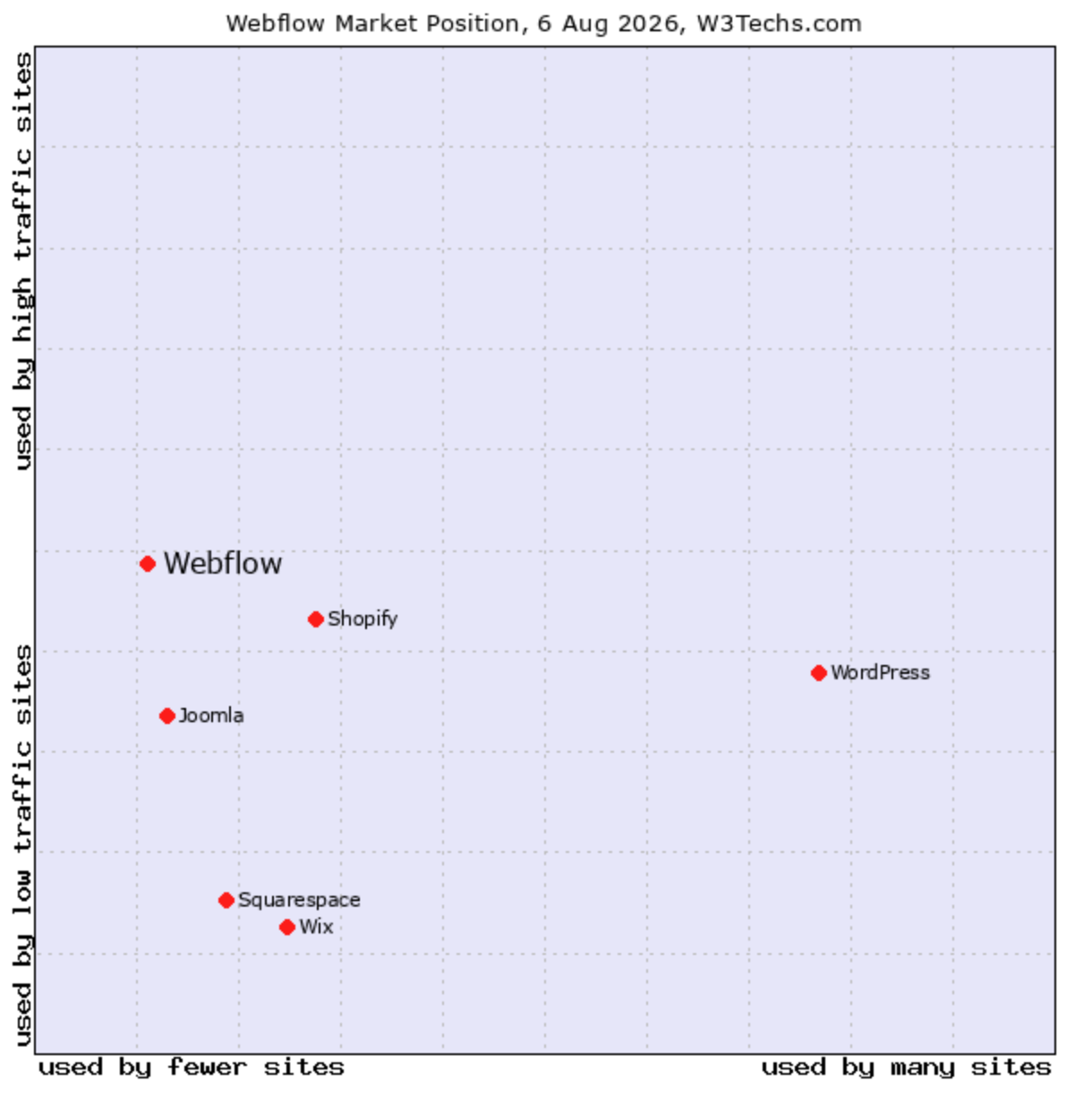
The market data suggests Webflow is used by fewer sites overall than mass-market builders, but it shows up more often on higher-traffic sites, which is a strong signal for businesses that care about performance and long-term site quality.
Squarespace sits much lower on the traffic axis, which fits its role as a more design-led, simpler publishing platform rather than a system for more demanding marketing websites.
In practical terms, that means Webflow is the better fit when the website needs to support deeper content structure, stronger editorial control, and a more serious marketing role.
Squarespace is still a good choice for smaller sites that value simplicity and aesthetics, but the graph suggests it is less often the platform behind the sites that are doing more of the heavy lifting.
For businesses that need a website built around long-term SEO and content growth, our Webflow team can help plan the technical and content foundation before development begins.
Which Platform Scales Better for Ecommerce and Content?
Webflow is usually the stronger choice for content-heavy and highly customized marketing websites, while Squarespace is often simpler for smaller stores and straightforward product catalogs.
Both platforms impose limits on plans, products, content items, forms, bandwidth, or contributor access. Those limits matter less for a small portfolio or five-page site, but they become more important when a business publishes regularly, adds languages, expands its catalog, or manages multiple contributors.
Before choosing a platform, estimate the number of products, CMS items, landing pages, contributors, form submissions, and integrations the website will need over the next two to three years.
Which Platform Is Right for Your Business?
Squarespace is the better fit when your priority is launching a polished, simple website quickly. Webflow is the better fit when your website needs to grow into a marketing and content platform.
Use Squarespace when:
- You need a portfolio, brochure website, or small service-business site.
- You want a guided editor and minimal technical setup.
- Your content structure is simple.
- You do not expect frequent campaigns or major website expansion.
Use Webflow when:
- You need full control over visual design and responsive layouts.
- SEO and organic growth are central to your acquisition strategy.
- You expect to publish content, landing pages, or CMS-driven pages regularly.
- Multiple marketing initiatives will depend on the website.
- You want the site to remain flexible as the business grows.
Our honest take: Squarespace wins on simplicity and short-term cost for small, static sites. Webflow wins almost everywhere a business expects to grow, publish more, or care about long-term SEO performance.
What Is the Real Trade-off Between Squarespace and Webflow?
The real trade-off is speed and simplicity today versus control and flexibility over time.
Squarespace reduces the effort required to launch and maintain a straightforward website. Webflow requires more setup, but it gives businesses greater control over design systems, CMS structure, SEO implementation, internal linking, and future growth.
For a simple website that is unlikely to change much, Squarespace may be the most practical choice. For a website expected to support marketing, content, campaigns, and search visibility for years, Webflow is usually the stronger long-term foundation.
FAQs
Yes, Webflow is generally better for technical SEO control and scored higher in the independent 2026 benchmark used in this comparison. Across 584 pages, Webflow scored 73.3 compared with Squarespace’s 57.1 for overall SEO, with higher structured data adoption and faster average page performance.
Sometimes, but not always. Advertised pricing is relatively close, while the total cost depends on transaction fees, CMS requirements, contributor access, forms, bandwidth, integrations, and add-ons. Squarespace may be better value for a simple site, while Webflow can become more cost-effective when a business needs greater design and content control without relying on as many additional tools.
Squarespace is usually the better choice for a small business that needs a polished, simple website launched quickly. Webflow is the better choice when the business expects to publish more content, run campaigns, invest in SEO, or require more control over the website’s design and structure.
Yes, you can migrate from Squarespace to Webflow later, but the process involves more than recreating the visual design. A careful migration should also preserve or improve URL structures, redirects, metadata, internal links, forms, analytics, images, and search visibility.
Webflow generally scales better for content-heavy marketing websites because it provides more control over CMS structures, page templates, internal linking, and structured content. Squarespace can still work well for smaller content libraries, but Webflow is usually the stronger option when a business expects to publish frequently, add landing pages, expand into multiple content types, or manage a larger website over time.