Most Webflow CMS problems don’t start with Webflow itself. They start when a website grows faster than the structure behind it. A few fields here, duplicate a collection there, hard-code a campaign page, and some workarounds whenever the existing model no longer fits. At first, those decisions seem harmless.
Over time, the website becomes harder to edit, slower to expand, and increasingly dependent on the people who originally built it. We’ve seen this problem from several angles: patched-together CMS setups, landing pages living in separate tools, multilingual sites with hundreds of page variations, etc.
The Key Question: What Will Change Constantly?
A useful Webflow CMS architecture begins with one practical question:
Which parts of this website will change repeatedly as the business grows?
Those areas should be structured for reuse, ownership, and controlled editing.
For example:
- Articles and resources
- Case studies
- Services.
- Industries
- Integrations
- Product or solution pages
- Authors
- Locations
- Testimonials
- Campaign landing pages
- Product catalogues
- Localized content
Not every piece of content needs to become a CMS collection. A one-off About page usually doesn’t need the same structure as 100 case studies. A reusable client record may deserve its own collection, while a single testimonial could be a part of a specific case study.
The goal is to identify repeatable business patterns - not to put every piece of website content into a database.
What We Learned From Bloomwell
Bloomwell came to Designbase with a heavily patched custom CMS that made even basic website updates difficult. The problem wasn’t simply that the system was old. The problem was that it had become impossible to extend safely.
Bloomwell needed a new website, but it also needed a better operating model:
- 123 modular components.
- 850+ products imported into Webflow.
- An automated product feed connected through n8n.
- Continuous syncing for prices, availability, and product status.
- More than 100 hours of estimated manual work saved per year.
The important lesson was that the product catalog couldn’t be treated like ordinary page content. Product information changed frequently and existed at a scale where manual maintenance was simply not sustainable. The website needed a structured source of truth and an automation layer that handled repetitive updates.
That’s the kind of distinction a CMS architecture needs to make early:
- Content that people write and review.
- Content that people reuse across pages.
- Content that changes based on external data.
- Content that requires a human decision before publication.
- Content that should be generated and updated automatically.
If all of those are treated in the same way, the CMS becomes difficult to operate.
Build Collections Around Real Content Types
A collection should represent something the business understands independently.
For example, an article is usually different from a case study because it has a different purpose, workflow, page structure, and conversion role. Combining them into one collection might reduce the number of collections, but it usually increases the number of confusing fields and exceptions.
A practical content model for a B2B website:
Each collection should have a clear answer to these three questions:
- What does this collection represent?
- Which page or component uses it?
- Who is responsible for maintaining it?
If those answers are unclear, the collection is probably solving a local design problem rather than a real content problem.
Avoid the Two Extremes
There are two common mistakes in CMS architecture.
The first is putting everything into one large collection, creating fields like:
- Type
- Layout
- Show quote
- Show video
- Show product details
- Show download
- Use alternate CTA
This model may appear flexible, but it usually shifts complexity into the template. Editors have to understand which combinations are valid, while developers maintain an expanding collection of conditional sections.
The second mistake is creating a collection for every reusable element. Logos, cards, labels, feature blocks, and small content fragments all become separate records. The result is technically reusable but difficult to navigate and maintain.
A better rule is:
Create a collection when the content has its own purpose, owner, lifecycle, or meaningful reuse pattern.
Don’t create a collection merely because an element appears more than once.
Use References to Avoid Content Drift
Growing websites often duplicate information before they connect it.
A client name, industry, service, author bio, or product label may be copied into several CMS items because it’s faster than deciding where the original information should live. That decision creates maintenance debt.
If an author changes their role, the team may need to update multiple articles. If a client changes its logo, several case studies may still show the old version. If an industry name changes, the navigation and related content blocks can become inconsistent.
Reference fields are useful when the related item exists independently and may be reused. Webflow’s CMS Collections are the best way to reuse structured content across a site and build new pages at scale.
For example:
- An article references one author.
- A case study references one client.
- A case study references one or more services.
- A service references relevant industries.
- An article references a topic or related resource.
Do not use references for every label. A relationship adds value when it prevents meaningful duplication or represents a real business connection.
Components Are the Publishing Layer
Collections organize content. Components organize how the team uses that content.
This distinction matters because a CMS can be technically well structured while the publishing experience remains slow. If every new landing page requires a designer to rebuild sections manually, the team still has a bottleneck.
The component system should give editors enough flexibility to assemble common pages without allowing every page to become a one-off design.
That usually means defining:
- Which sections can be used.
- Which content each section accepts.
- Which variants are approved.
- Which fields are required.
- Which properties editors can change.
- Which decisions require a developer or designer.
The goal is not unlimited freedom, but controlled autonomy.
The Instaffo Lesson: Give Marketing More Control
Instaffo had a different problem from Bloomwell. The issue was not a large product catalog. It was fragmentation.
The main website ran on Webflow, while more than 120 landing pages lived in Instapage. The two systems had different visual styles and no shared component logic. Campaign growth meant more pages, but it also meant more inconsistency and more developer dependency.
Designbase migrated and redesigned the 120+ landing pages, then created a Webflow-native component system that allowed the Instaffo team to assemble new landing pages independently.
For a marketing team, the real question is not “Can we store this content?”
It’s:
- Can we launch a new campaign without creating another system?
- Can we reuse approved sections without breaking the brand?
- Can we test a new message quickly?
- Can we update shared content centrally?
- Can someone who did not build the website understand how to use it?
A well-built component library answers those questions by turning common page patterns into a repeatable publishing system.
Design for Localization Before Migration
Localization should be part of the architecture before the first large content migration. Adding it later often exposes problems with fields, slugs, navigation, relationships, metadata, and page templates.
Start by deciding what’s shared and what varies by locale.
Shared content:
- Product names
- Company names
- Logos
- Technical identifiers
- Some legal information
- Global brand assets
Localized content:
- Headlines
- Intro copy
- Body content
- CTAs
- Metadata
- Navigation labels
- Testimonials
- Images and captions
- Market-specific contact details
- Related content selections
Webflow invested heavily in its localization workflow in 2026, including a dedicated localization panel and bulk translation capabilities for CMS content. Those improvements can make multilingual publishing more efficient, but they don’t remove the need to define the content model first.
A translation tool can translate a field. It cannot decide whether that field should exist, whether the translated page needs a different CTA, or whether a German page should use the same case study as its English equivalent.
Google recommends separate URLs for language and regional versions and the use of hreflang annotations to explain the relationship between them.
For example:
<link rel="alternate" hreflang="en" href="https://www.example.com/services/webflow"
/><link rel="alternate" hreflang="de" href="https://www.example.com/de/services/webflow"
/><link rel="alternate" hreflang="de-AT" href="https://www.example.com/at/services/webflow"
/><link rel="alternate" hreflang="de-CH" href="https://www.example.com/ch/services/webflow"
/><link rel="alternate" hreflang="x-default" href="https://www.example.com/services/webflow"/>Each relevant version should reference itself and the other alternatives. URLs should be fully qualified and the language or regional code should match the intended audience.
What talque Revealed About Scaling Across Languages
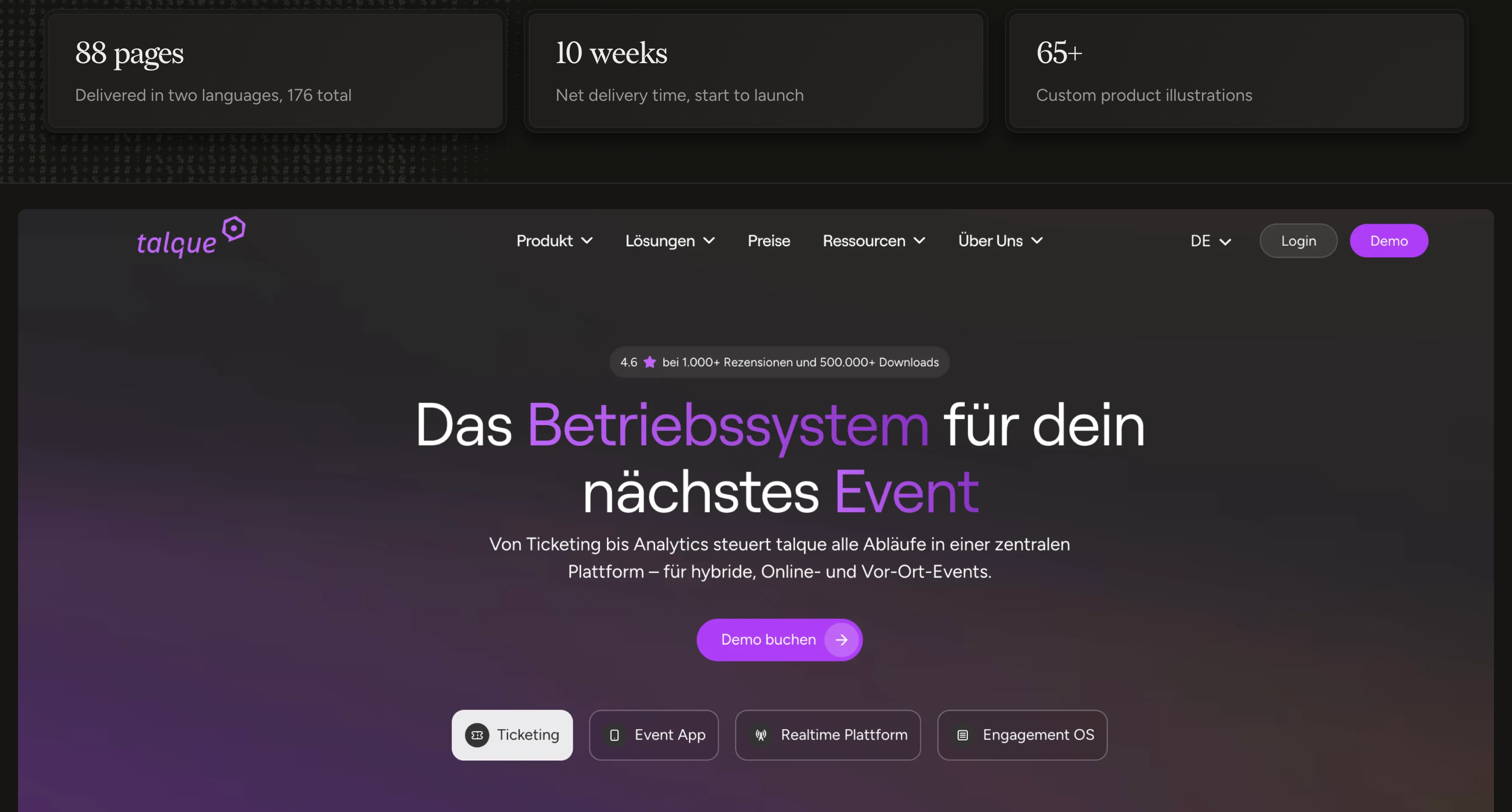
talque required a large multilingual website with 88 pages across two languages, resulting in 176 localized pages. The site included product pages, solution pages, release notes, documentation, integrations, case studies, and About content.
That type of project cannot be managed as a series of isolated pages. It needs a system:
- Repeating page structures.
- Managing localized content.
- Maintaining relationships.
- Keeping navigation consistent.
- Handling different content types.
- Testing long and short versions of the copy.
- Reviewing every locale before launch.
The lesson from a multilingual build is that localization increases the number of editorial states the website must support. A page can be:
- Complete in the primary language.
- Translated but not reviewed.
- Published in one locale but missing in another.
- Structurally correct but commercially inappropriate.
- Updated in the primary language but outdated elsewhere.
The CMS and editorial workflow should make those states visible. Otherwise, the team may believe the website is complete when important markets are still using incomplete or outdated content.
Make Important Content Easy to Verify
In 2026, CMS architecture also affects how content performs in AI-assisted search environments.
There’s no special field that guarantees an AI citation. However, a structured CMS can make it easier to publish content that is clear, attributable, current, and supported by evidence.
Google’s guidance for AI features in Search points site owners back to the same fundamentals as traditional Search: useful content, technical accessibility, and pages that provide value to users. Google also recommends original, expert-led content that adds value beyond commonly available information.
Use AI Without Losing Ownership
Webflow introduced AI-connected workflows in 2026, including a Claude connector for bulk CMS updates, SEO audits, and design-system audits. Webflow also introduced MCP 2.0 support for connecting Webflow sites with AI tools like Claude, ChatGPT, and Cursor.
These workflows can reduce repetitive work, but they also increase the importance of permissions and review.
AI is most useful for:
- Drafting metadata
- Identifying missing fields
- Classifying content
- Suggesting related content
- Preparing translation drafts
- Finding inconsistent naming
- Auditing repeated content
- Updating low-risk records in bulk
The most important part is to give AI access to the fields and actions it needs, not automatically to the entire website. High risk changes should still require human review.
Build a Review Process, Not Just a Database
A scalable CMS needs clear maintenance rules from the start. For each important collection, define who can create and review content, which fields are required, which claims need evidence, and when an item should be updated, archived, or escalated for a structural change.
The same rules should clarify where AI can help like drafting metadata or identifying incomplete records, and where a human editor must remain responsible, including factual claims, translations, SEO decisions, and publishing.
However, this doesn’t need to become a complex governance situation. A concise collection guide, a named owner, and a regular review cycle will prevent most avoidable issues. Product details, pricing, integrations, service information, and company claims all change over time, so high value pages should include a clear owner and last reviewed date. When something becomes outdated, the team should know exactly who’s responsible for checking and updating it.
When the Architecture Needs Rebuilding
A CMS architecture needs more than a small adjustment when the same problems appear across multiple workflows.
Common signs:
- Marketing cannot publish without developer support.
- The same information is copied across many records.
- Collection fields have different meanings in different items.
- Templates contain too many conditional sections.
- Campaign pages live in multiple platforms.
- Localized pages are managed manually and inconsistently.
- External data is updated by hand.
- No one knows which content is current.
- AI-generated content enters the CMS without clear review.
- New page types require a workaround every time.
But the answer is not always a complete rebuild. Sometimes a focused refactor is enough: consolidate collections, rename fields, create references, rebuild a template, or migrate campaign pages into an existing component system.
The right starting point is an audit of how the team works today. Look at the time required to launch a page, update shared information, localize content, correct an error, and retire an outdated record.
A CMS is not scalable because it has a high item limit. It’s scalable when the team can keep using it correctly as the business becomes more complex.
Build for the Way Your Team Works
The best Webflow CMS architecture is not the most elaborate one. It’s the one that reflects the way the business actually grows and makes everyday publishing easier rather than adding more work.
That was the common thread across these projects:
Bloomwell needed structured product data and automation because manual catalogue updates could not keep pace with 850+ products.
Instaffo needed a unified component and landing page system because disconnected tools were slowing campaign delivery.
talque needed a content and localization model capable of supporting 176 pages across two languages.
The rule is simple: structure content that changes repeatedly, connect information that’s reused, and turn recurring page patterns into components. Plan localization before migration, and keep clear ownership, permissions, evidence, and human review in place when AI supports the workflow.
When those foundations are properly in place, Webflow CMS becomes more than a place to store content. It becomes reliable website infrastructure helping the marketing team move faster while protecting consistency, accuracy, and control.
FAQs
Decide which content will be created, updated, or reused repeatedly. Build clear collections, fields, relationships, and ownership rules around that content.
No. Create a collection only when content has its own purpose, lifecycle, owner, or meaningful reuse across the site. Keep one-off content inside pages or components.
It cannot guarantee AI citations. It can support clearer authorship, sources, relationships, and up-to-date content - foundations for useful, people-first pages.
Only for low-risk, pre-approved updates. A human should review claims, translations, indexing, redirects, and any structural CMS changes before publishing.
Refactor when publishing is slow, content is duplicated, templates rely on too many exceptions, or the team cannot manage localization, integrations, or campaigns without developer support.