Most outbound landing pages fail before anyone reads them. They're generic, they don't reference the prospect's company, and they look identical to every other page in your competitor's playbook. If you're running account-based marketing in 2026, that's a conversion killer you can't afford.
At Designbase, we build ABM landing pages for B2B teams that need to move fast without sacrificing relevance. The Clay and Webflow integration is the backbone of how we do it - giving marketing teams a repeatable system. This guide breaks down exactly how you can approach it: the architecture, the data strategy, and the Webflow setup.
Why Generic Landing Pages Kill ABM Campaigns
Account-based marketing lives or dies on relevance. Sending a target account to a page built for anyone signals that you haven't done your homework. In B2B sales - where buying committees are skeptical and attention is scarce - that's often enough to kill a deal before it starts.
The manual alternative isn't much better. If you've done ABM at any real scale, you know the pain: a designer builds a custom page, a copywriter tailors the messaging, someone uploads the prospect's logo, and three days later you have one personalized landing page for one account. Multiply that by 50 target accounts and the math falls apart fast.
This is the exact problem we solve at Designbase. The Clay and Webflow integration lets us build a system once - the design template, the data schema, the field mapping - and then generate hundreds of account-specific pages in the time it would take to build one manually.
Here's what that looks like in practice:
- The prospect's company logo and brand colors embedded in the design.
- A headline that references their industry, company name, or specific pain point.
- Social proof from companies similar to theirs (industry, size, tech stack).
- A value proposition rewritten around their likely priorities.
- A CTA matched to where they are in the buying journey.
- No mention of anything irrelevant to their situation.
When every one of those elements is dynamic - pulled from enrichment data and swapped automatically per account - you get the personalization of a hand-crafted page at the speed of a template.
What the Clay and Webflow Integration Actually Does
The Clay and Webflow integration connects Clay's data enrichment and research automation with Webflow's CMS to build personalized, dynamic landing pages at scale - automating content population and syncing enriched account data to CMS collections, no code required.
Here's how to think about the architecture:
- Clay is your data layer. It pulls, cleans, enriches, and structures account data from dozens of sources - LinkedIn, Crunchbase, Clearbit, Apollo, and more.
- Webflow is your presentation layer. It takes that structured data and renders it as a live, published landing page at a unique URL.
- The integration is the bridge: Clay pushes data directly into Webflow CMS collections, which automatically populate your page template.
The result: personalized ABM microsites - unique landing pages for each target account featuring their logo, industry-specific messaging, and tailored value propositions, all generated from a single Webflow template and a single Clay workflow.
You can set this up in three steps, depending on your technical level:
- No-code (Clay app): Install the Clay app from Webflow's Apps panel, authorize the connection, and map fields visually.
- Native automation: Use Clay's built-in automation features to trigger Webflow CMS updates based on workflow events.
- API-level integration: For teams with development resources, both platforms expose full APIs that support real-time personalization and bidirectional data sync.
Step 1: Architect Your Webflow CMS Collection Correctly
This is where most teams get into trouble. The quality of your personalized landing pages is a direct function of how well your Webflow CMS collection is structured before any data flows into it.
The core principle: every element you want to personalize needs a corresponding CMS field. This sounds obvious, but the implications go deeper than most teams realize at the outset.
The Fields You Actually Need
Beyond the obvious ones (company name, logo), a well-architected ABM CMS collection should also include:
The “Slug” field deserves special attention. This is what gives each account their unique URL - “yoursite.com/tools/salesforce” or “yoursite.com/abm/designbase. A clean slug structure makes tracking easier and makes the page feel purpose-built when a prospect sees the URL in their email.
Dynamic Collections as a Template System
Think of your Webflow CMS collection as a master template, not a page. Every personalized landing page your team sends is a rendered instance of that template - automatically populated with account-specific data. The design stays consistent - the content changes.
This is exactly how Webflow's dynamic collections are designed to work. You create a single page framework with all your design decisions baked in, then let the CMS populate each instance with the relevant content.
We build these CMS-backed templates with personalization in mind from the first wireframe - establishing field bindings for every dynamic element before a single line of design work happens. Retrofitting is much harder than designing for it from the start.
Design for the Edge Cases
A common mistake is designing only for the "ideal" data state. In the real world, some accounts won't have a brand color in your enrichment data. Some logos will be low-res or in the wrong format. Some industries won't map cleanly to your testimonial variants.
Build fallbacks into your template:
- A default brand color when enrichment data is missing.
- A placeholder/generic logo state for accounts without a clean image URL.
- A default headline variant when no industry match is found.
- A universal testimonial block that works for any vertical.
Step 2: Build Your Enrichment Workflow in Clay
Clay's power in this context isn't just that it can pull company data - it's that it can synthesize it into exactly the personalized content fields your Webflow template expects.
Start With a Clean Target Account List
Import your ICP accounts into Clay. At minimum you need a company name and either website domain or LinkedIn URL - Clay can derive almost everything else from those two inputs.
A strong ABM workflow in Clay typically starts with a hyper-targeted list built from multiple signals:
- LinkedIn Sales Navigator exports filtered by industry, headcount, and revenue range.
- Crunchbase for funding stage and recent investment activity.
- G2 or BuiltWith for tech stack data.
- Your own CRM for existing relationship signals.
Each of these data points becomes ammunition for personalization. The more signals you have, the more specific your landing page messaging can be.
Enrichment Layers That Drive Personalization
Once your base list is in Clay, run it through enrichment columns.
Here’s the usual stack for ABM campaigns:
Company fundamentals:
- Clearbit or Apollo for company size, industry classification, annual revenue range.
- Brandfetch or Clearbit logo API for brand logos in SVG or PNG format.
- Crunchbase for funding stage and most recent round details.
Signal-based personalization:
- BuiltWith or Clay's native tech stack enrichment to identify existing software.
- LinkedIn company page scraping for recent company news, hires, or announcements.
- Google News or Perplexity research columns for recent press coverage.
AI-generated content fields:
- Use Clay's AI columns (powered by GPT-4 or Claude Sonnet) to write a custom value proposition per account based on their industry, company size, and tech stack.
- Generate a personalized headline variation that names the company or references their specific situation.
- Write a tailored CTA that reflects where the account is in their buying journey.
This last layer - AI-generated copy - is where the real magic happens. Instead of manually writing 200 variations of your headline, you write one detailed prompt, run it across your Clay table, and get account-specific copy that even a human copywriter would be proud of.
Example Clay AI prompt:
"Write a 2-sentence value proposition for [Company Name], a [headcount]-person [industry] company that uses [tech stack]. The value proposition should explain how [your product] helps [industry] companies [primary pain point]. Write in a confident, direct tone. Do not use jargon. Do not mention competitors."
The output becomes a CMS field. It populates directly into your Webflow template.
Step 3: Connect Clay to Webflow and Push the Data
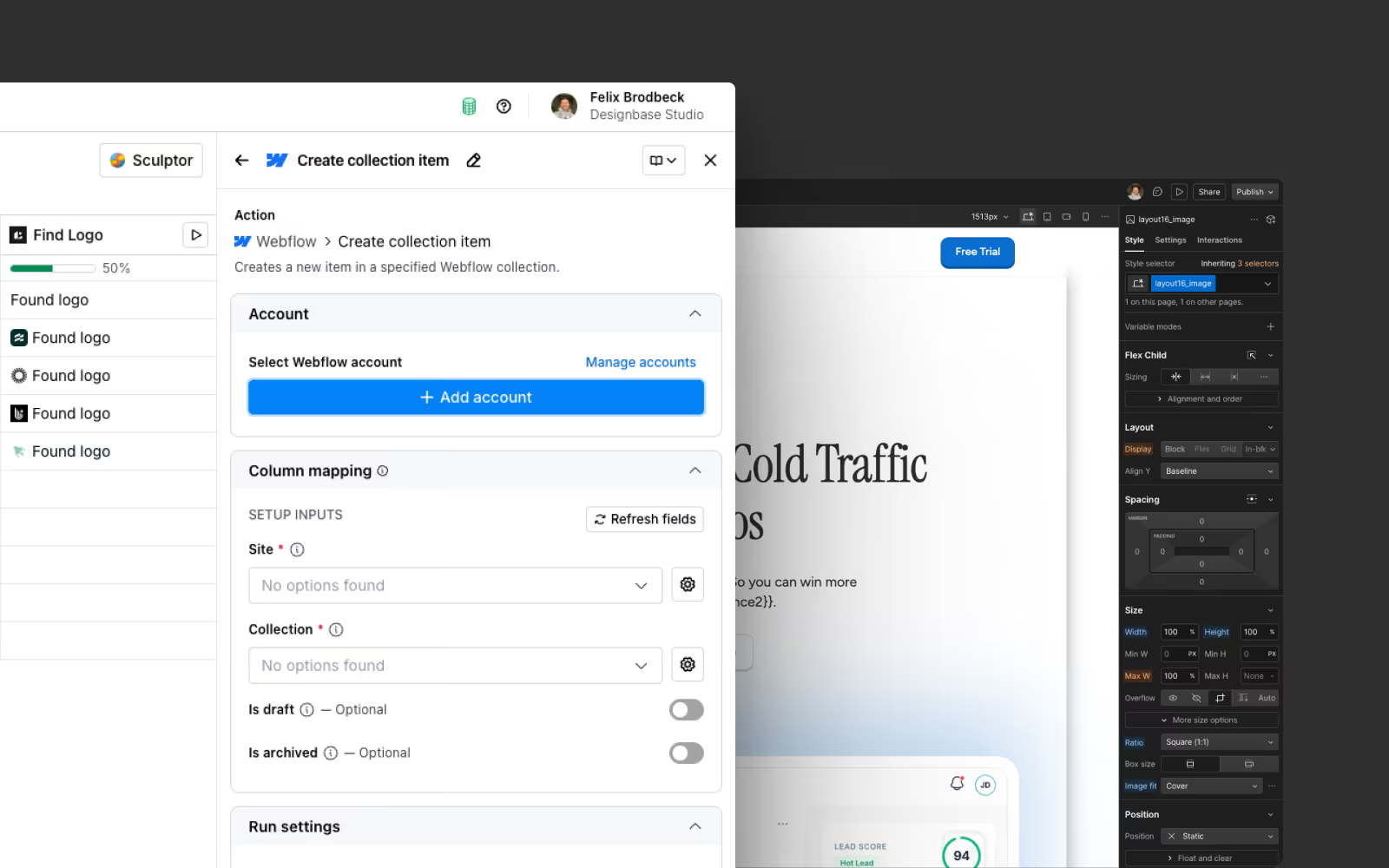
With your CMS collection structured and your enrichment workflow built, the actual integration is straightforward.
Installation and Authorization
Install the Clay app from Webflow's Apps panel. This gives you a persistent, authorized connection between your Clay workspace and your Webflow site.
In Clay, navigate to the Webflow integration column. You'll select:
- Your authorized Webflow site.
- The target CMS collection.
- The action type: Create Collection Item (for new accounts) or Update Item (for existing pages you're refreshing).
Field Mapping
This is where you connect the dots between your Clay table columns and your Webflow CMS fields. Map each column to its corresponding field:
- Company Name (Clay) → Company Name (Webflow field)
- Logo URL (Clay) → Logo Image (Webflow field)
- AI Value Proposition (Clay) → Value Prop Body (Webflow field)
- Brand Color Hex (Clay) → Brand Color (Webflow field)
- Slug (Clay) → Slug (Webflow field)
A few important configuration details:
Duplicate prevention: Configure a unique identifier (typically the company domain or slug) to prevent creating duplicate CMS entries if you run the workflow more than once. Clay's "Update or Create" logic handles this automatically if configured correctly.
Staging vs. live publishing: By default, new Webflow CMS items are created as drafts. Configure your Clay action to publish immediately, or build a review step into your workflow so a human can QA before pages go live.
Conditional logic: Build column-level conditionals in Clay to handle edge cases - for example, only push a logo URL to Webflow if the URL is valid, otherwise push a fallback value.
Running the Workflow
Once field mapping is configured, run the workflow. For a list of 100 accounts, all 100 pages are created in Webflow simultaneously. What used to take a design team weeks now takes minutes.
Each page is immediately available at its unique URL, ready to be dropped into your outbound sequence.
What You Can Personalize - Going Beyond the Basics
Most teams stop at company name and logo. That's basic personalization - it looks custom but doesn't really speak to the prospect's situation.
If you’re serious about ABM, you can do so much more:
Layer 1: Identity Personalization
The basics: company name, logo, brand colors. These signal effort and make the page feel built for the recipient. Essential, but table stakes.
- Company logo in the hero section.
- Brand primary color applied to section backgrounds or button styles.
- Company name in the headline ("How Salesforce Teams Use [Product]").
Layer 2: Contextual Personalization
This is where conversion rates actually move. Contextual personalization means the page content changes based on who the prospect is, not just what their company is called.
Industry-specific messaging: A landing page for a healthcare company should reference HIPAA compliance and EHR integrations. For example, a page for a fintech should reference SOC 2 and data security. These aren't just nice-to-haves - they're credibility signals.
Company size-appropriate social proof: Show testimonials from companies that look like theirs. A 50-person startup doesn't trust a Salesforce case study. A Fortune 500 doesn't trust a startup testimonial.
Tech stack-matched integration highlights: If enrichment data shows the prospect uses HubSpot, move your HubSpot integration feature to the top of the page. This is the single highest-leverage personalization move most teams aren't making.
Layer 3: Behavioral Personalization
For teams with more sophisticated setups, you can incorporate intent signals and behavioral data:
- If the account has been researching competitors, adjust the CTA and messaging to emphasize a specific differentiator.
- If someone from the account visited your pricing page, configure the landing page to surface pricing information directly.
- If the account recently closed a funding round, reference growth and scaling in the headline.
This level requires additional tooling (typically Clearbit Reveal, 6sense, or RB2B for website identification, plus custom Webflow integrations), but the infrastructure you build in steps 1-3 supports it once you're ready to layer it on.
Keeping 200 Pages Updated Without Losing Your Mind
One of the most underrated benefits of this architecture is what happens when your messaging changes mid-campaign.
Without this system: you update 200 pages manually, or you let the old messaging sit while your positioning evolves underneath it.
With this system: you update the relevant column in Clay (or the underlying data source), re-run the workflow, and every connected Webflow page reflects the change. One source of truth, instant propagation.
Specific update examples we've run for clients:
New case study lands: Update the featured testimonial field in Clay for all accounts in the relevant industry. Push to Webflow. All industry-specific pages now feature the new proof point.
Pricing changes: Update the CTA copy and any pricing references in Clay. Push to Webflow. Campaign continues without interruption.
Messaging pivot: Rewrite the AI prompt for value proposition generation, re-run the enrichment column, push the new copy to Webflow. All 200 pages updated in under an hour.
This is the operational argument for this architecture that most marketing teams don't fully appreciate until they're in the middle of a live campaign and need to pivot.
Integrating ABM Landing Pages Into Your Outbound Sequence
A personalized landing page that nobody visits is a craft project, not a marketing asset. The page needs to be the destination of a cohesive outbound sequence - and every element of that sequence should reinforce what the prospect sees when they click through.
The Sequence-To-Page Alignment Checklist
Before launching, verify:
The email subject line and the page headline are thematically consistent. If your subject line references their tech stack, the page should too.
The sender name in the email matches the signatory on the page CTA. "Book a call with [Rep Name]" should use the same name throughout.
UTM parameters on your landing page URL tie back to the correct campaign in your CRM. Without this, you can't attribute pipeline to your ABM pages.
The Calendly, Chili Piper, or booking tool embedded in your CTA is routed to the correct rep. Don't let a personalized page send a hot lead to a generic scheduling link.
URL Strategy
How you structure your landing page URLs matters more than most teams realize. Options:
yoursite.com/for/[company-name] - Clean, prospect-facing, signals the page was built for them.
yoursite.com/abm/[campaign-tag]/[company-slug] - Better for internal campaign tracking.
go.yoursite.com/[company-slug] - Subdomain keeps ABM pages separate from your main site.
We typically recommend the first option for the prospect experience, with UTM parameters handling the tracking layer so you're not exposing internal campaign taxonomy in the URL.
Webflow Dynamic Content: Technical Considerations
For teams evaluating Webflow as the presentation layer for their ABM pages, a few technical details are worth understanding.
CMS Item Limits
Webflow's CMS has item limits based on your plan tier. At scale (500+ target accounts), verify that your plan accommodates the number of CMS items your campaign requires. For enterprise ABM programs, this may require a Webflow Enterprise plan or a CMS architecture that segments accounts across multiple collections.
Webflow Gated Content
If your ABM landing pages include gated content - white papers, ROI calculators, personalized benchmark reports - Webflow's native gating capabilities are limited.
Options for implementing Webflow gated content at scale:
- Memberstack or Outseta: Third-party membership tools that integrate with Webflow for form-gated content delivery.
- Custom form + Clay webhook: Capture the form submission in Webflow, pass it to Clay via webhook, trigger a personalized follow-up sequence.
- Webflow Logic (Webflow's native automation): For simpler gating scenarios, Webflow Logic can handle form submissions and basic conditional content delivery.
Page Performance
Personalized landing pages live and die by load speed. A few Webflow-specific performance considerations:
- Host logos in Webflow's asset manager rather than pulling from external URLs, which can be slow or return 404s if the source changes.
- Use Webflow's native image optimization rather than raw logo URLs from enrichment data.
- Avoid embedding too many third-party scripts (session recording, chat widgets, multiple analytics tags) that bloat page weight.
The Designbase Approach: What We Build and Why
We've built ABM landing page systems for B2B companies across SaaS, professional services, fintech, and enterprise software.
Here's what we've learned about what separates high-performing setups from ones that look great but don't convert.
Design decisions that affect conversion:
- Above-the-fold personalization density: The prospect's company name or logo needs to appear in the first viewport. If they have to scroll to see anything that proves the page was built for them, you've already lost them.
- Social proof placement: Don't bury your testimonials at the bottom. The most relevant proof point - the customer that looks most like the prospect - should appear in the first 50% of the page.
- CTA specificity: "Book a Demo" converts worse than "See How [Company Name] Can Use [Your Product]." Use the prospect's company name in the CTA. Clay makes this trivial to generate at scale.
- Mobile optimization: Many ABM sequences are opened on mobile. Your personalized landing page needs to look as intentional on a phone as it does on a desktop.
Data decisions that affect relevance:
- Prioritize tech stack data: Knowing what software a prospect already uses unlocks more relevant personalization than any other single data point.
- Run a manual QA pass on logo quality before pushing to Webflow: Low-res or mismatched logos undermine the credibility of the entire page.
- Set a minimum data completeness threshold before a page gets published: A page with 3 out of 8 personalization fields populated reads as broken, not personalized.
FAQs
For just a basic setup, no. The Clay app enables no-code management of your Webflow CMS collections directly from Clay tables - you can automate the creation, updating, and bulk management of CMS items by visually mapping Clay data to Webflow fields.
However, the level of personalization this article covers is a totally different story. Real-time personalization, conditional logic, behavioral layers, API-level integration, custom gating, and maintaining 200+ pages without breaking anything - that's not a simple afternoon project.
Teams that want to build this system properly, and have it actually perform, would have to work with a specialist team. It's what we do at Designbase, and it's why we built this guide: so you understand exactly what's the deal before you start.
The integration supports creating and managing dozens to hundreds of personalized landing pages, each tailored to a specific target account. The practical limit is the size of your target account list, your Webflow CMS item tier, and the quality of your enrichment data - not the platform itself.
Common enrichment sources include company logo, brand colors, industry classification, company headcount, tech stack, recent funding activity, job titles of key stakeholders, and recent company news. Clay also supports AI-generated fields - meaning you can use enriched data as inputs to generate custom copy, headlines, and value propositions for each account automatically.
Yes. The same personalized landing page infrastructure works for ABM campaigns, outbound email sequences, inbound follow-ups, LinkedIn ad destinations, and event follow-up sequences. Any scenario where you want a prospect to land on a page that feels built specifically for them is a valid use case for this workflow.
The integration itself is accessible to most marketing ops teams with some Webflow experience. Where Designbase adds value is in the design architecture (building a template that flexes cleanly across hundreds of account variants without breaking), the data schema (structuring Clay and Webflow fields to support the personalization depth your campaign actually needs), and the conversion optimization layer (knowing which personalization decisions actually move metrics and which are cosmetic). We've built enough of these systems to know what the common failure points are - and we build to avoid them from the start.