Most B2B SaaS websites are built like projects: design, development, launch, and handoff. That model breaks down as soon as messaging, campaigns, and target markets start changing.
A better approach is to use Webflow as GTM infrastructure: a website system that marketing can update, connect to the revenue stack, and improve continuously.
In practice, that means using Webflow to:
- Launch campaign and ABM landing pages without waiting for engineering.
- Build CMS-driven solution, industry, and comparison pages.
- Connect forms, tracking, CRM workflows, and attribution.
- Test messaging and conversion paths continuously.
- Give marketing ownership of the website after launch.
The goal is not simply a better-looking website. It's a web system that helps B2B SaaS teams turn campaigns and content into pipeline faster.
What Does GTM Infrastructure Mean for a B2B SaaS Website?
GTM infrastructure is the set of systems and workflows that help a revenue team create, capture, and measure demand. The website is part of that infrastructure because paid campaigns, outbound sequences, organic content, product-led journeys, and demo flows all depend on it.
A GTM-ready website should be:
- Fast to update.
- Connected to the CRM and analytics stack.
- Structured for repeatable content.
- Easy to measure.
- Owned operationally by marketing.
The practical difference is simple:
How Does Webflow Help Marketing Teams Move Faster?
Webflow helps marketing teams publish pages, update messaging, manage CMS content, and test conversion elements without waiting for an engineering sprint. That makes it useful for teams whose campaigns and positioning change faster than a traditional development workflow can support.
A properly structured Webflow site should give marketing control over:
- Landing page creation.
- Page and section content.
- Blog and resource publishing.
- Solution and industry pages.
- Forms and conversion paths.
- Reusable components and layouts.
The important qualification is that Webflow only creates this leverage when the site has been built with a clear design system, reusable components, and a CMS architecture that marketing can actually use.
What Does This Look Like in Practice?
Crewmeister (read case study) is a useful example of what happens when a B2B SaaS website becomes a growth system rather than a collection of static pages.
The company was running a significant paid acquisition program through a website with no CMS. Every landing page change, headline test, and campaign adjustment required developer support. Designbase rebuilt the site in Webflow with 47 modular, conversion-focused components that the marketing team could use to assemble and update pages independently.
The project also included a phased migration, Webflow Optimize setup, and enablement for the internal team to run ongoing A/B tests. Within six months of launch, Crewmeister recorded a 50% conversion rate uplift.
This project demonstrates the practical difference between a website that requires developer support and a modular system that lets marketing launch, test, and improve pages independently.
What Should B2B SaaS Companies Build in Webflow?
B2B SaaS teams can use Webflow to build repeatable page types instead of treating every new page as a custom project.
Some examples:
- Campaign landing pages: Focused pages for paid, outbound, and product campaigns.
- ABM pages: Pages tailored to industries, account segments, or high-value use cases.
- Solution pages: Pages that connect product capabilities to specific customer problems.
- Industry pages: Repeatable pages for target verticals.
- Comparison pages: Structured pages targeting alternative and competitor-related searches.
- Integration pages: Pages explaining how the product connects with other tools.
- Partner pages: Co-marketing, integration, and ecosystem pages.
- Programmatic SEO pages: CMS-driven pages built from controlled templates and structured data.
The point is not to publish hundreds of almost identical pages. It's to create a system where useful, search-focused pages can be produced consistently without redesigning or redeveloping each one.
How Should Webflow Be Used for Campaigns and ABM?
Webflow is most useful for campaigns when the team can move from brief to published page quickly. A campaign page should match the campaign message, focus on one conversion goal, and send reliable data into the relevant CRM and reporting workflow.
A practical campaign workflow looks like this:
- Define the audience, offer, and conversion goal.
- Select an existing landing page template.
- Add campaign-specific messaging and proof.
- Connect the form or CTA to the correct workflow.
- Add tracking and UTM parameters.
- Publish and check the page on mobile.
- Review conversions and improve the page.
For ABM, the same system can support pages for target industries, account groups, use cases, or buying stages. Webflow becomes more useful here when those pages are connected to a repeatable personalization workflow rather than built as isolated one-off designs.
For a practical example, see our tutorial to building personalized landing pages with Clay and Webflow.
How Does Webflow Support Programmatic SEO?
Webflow supports programmatic SEO through CMS collections and reusable templates. A team can create a structured page type - an integration, industry, use case, or comparison page - and populate it from a controlled dataset.
A useful CMS model might include fields for:
- Page title and URL slug.
- Audience or industry.
- Customer problem.
- Product solution.
- Use case content.
- Supporting proof.
- Related resources.
- Primary conversion CTA.
- SEO title and meta description.
Programmatic SEO should not mean publishing thin pages at scale. Each page needs a distinct search intent, useful information, internal links, and a clear reason to exist.
For example, a SaaS company might create structured pages for integrations, industries, use cases, or alternatives. Each page can use the same layout while drawing on different data, proof points, and conversion paths.
For a more detailed implementation guide, see how to build programmatic SEO in Webflow.
How Does Webflow Connect to the SaaS GTM Stack?
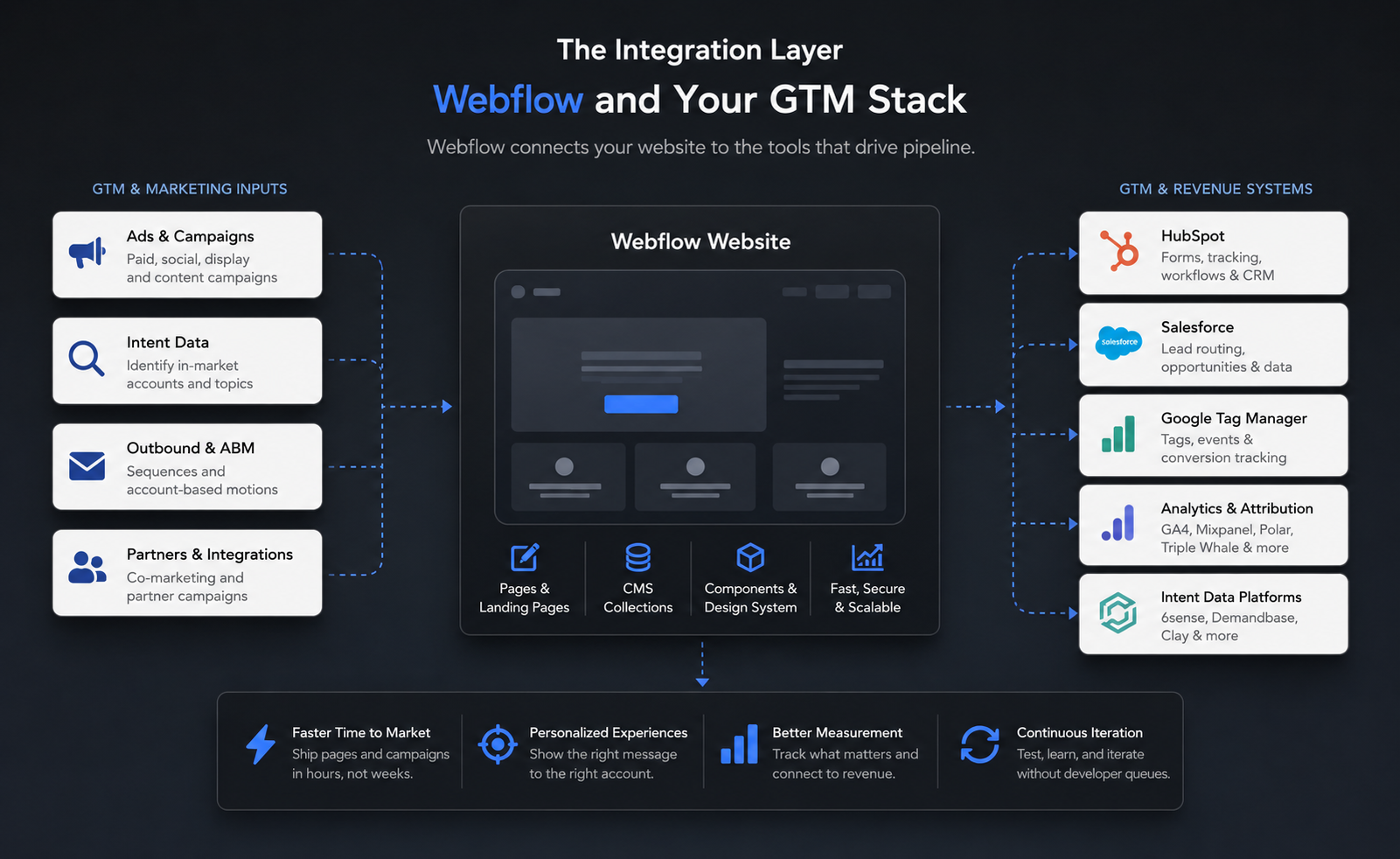
In our Webflow projects, we plan integrations around the conversion journey - not add them as technical details after launch. Webflow becomes the front end of the GTM stack, connecting campaign pages and forms with the CRM, analytics, tracking, and attribution systems the revenue team already uses.
Before launch, we define:
- Where form submissions go.
- Which CRM fields and UTM parameters are captured.
- How demo, trial, and other conversion events are tracked.
- Which events are managed through Google Tag Manager.
- How consent, third-party scripts, and attribution are handled.
Webflow supports Google Tag Manager through the Google Site Tools app or site-level custom code, allowing teams to manage tracking without editing every page individually. Webflow's integration documentation explains both setup options.
What Should the Team Measure?
A GTM-focused Webflow setup should measure more than traffic. In our own site reviews, we look at:
- Landing page conversion rate by campaign.
- Form submissions by source and medium.
- Demo or trial starts.
- Qualified leads passed to the CRM.
- Conversion rate by page type.
- Pipeline influenced by organic, paid, and outbound traffic.
- Pages that attract traffic but fail to convert.
This creates a feedback loop between the website and the revenue team. Marketing can see which pages generate action, sales can understand where leads came from, and both teams can prioritize improvements based on business impact rather than page views alone.
One practical lesson from our own performance reviews is that rankings should never be evaluated in isolation. A page can hold a strong average position but still need a clearer title, better search alignment, or a more relevant conversion path if it generates impressions without meaningful clicks or leads.
The goal is not to connect every available tool. It's to make sure the website does not create a gap between a prospect's first conversion and the revenue team's ability to act on it.
What Does a GTM-Ready Webflow Build Require?
A GTM-ready Webflow site needs more than a polished visual design. It needs the structure required for ongoing publishing, measurement, and iteration.
Before launch, define:
- The CMS collections marketing will manage.
- The reusable components and page templates.
- The required landing page types.
- The CRM and form-routing logic.
- The tracking and attribution plan.
- The ownership and publishing workflow.
- The rules for creating, reviewing, and retiring pages.
Marketing should also own the operating process after launch. Webflow can reduce developer dependency, but it doesn't automatically give a team the time, skills, or process needed to manage the site well.
This is where the choice of Webflow partner matters. A suitable partner should understand not only visual design and development, but also CMS architecture, conversion paths, analytics, integrations, and the publishing needs of a B2B SaaS team.
When Is Webflow the Right GTM Platform?
Webflow is a strong fit when a B2B SaaS company needs a custom marketing site that can support frequent campaigns, structured content, integrations, and ongoing optimization.
It's much less suitable when:
- The website is mostly static and rarely changes.
- The project requires complex application functionality.
- Ecommerce operations are the primary use case.
- The team needs full control over hosting infrastructure.
- Nobody owns the website after launch.
The platform is not the strategy. It is the operating layer that makes the strategy easier to execute.
For B2B SaaS companies, Webflow is most valuable when it's built as part of the GTM system rather than treated as a finished website.
The Crewmeister project shows what this looks like in practice: a modular Webflow system, marketing ownership, faster campaign iteration, ongoing A/B testing, and a documented 50% conversion-rate uplift within six months.
The practical model is straightforward: use reusable page systems for campaigns, CMS collections for scalable content, integrations for lead capture and attribution, and a clear marketing-owned workflow for ongoing updates.
That is what turns Webflow into GTM infrastructure. It helps the team publish faster, connect the website to the revenue stack, and improve the pages that influence pipeline.
If your Webflow site needs to support campaigns, content, integrations, and continuous growth, Designbase can help you build the system behind it.
FAQs
Yes. Webflow gives B2B SaaS marketing teams direct control over pages, content, campaigns, and conversion tests without relying on engineering for every update. That makes it a strong fit for companies whose messaging, ICPs, and campaigns change frequently.
A website treated as a project is built, launched, and gradually neglected. A website treated as GTM infrastructure is continuously maintained, measured, and improved. The difference is visible in ownership, update speed, and measurement: marketing ownership, faster iteration, and pipeline metrics instead of page views alone.
Yes. Webflow can connect forms, tracking, and conversion paths with HubSpot, Salesforce, analytics platforms, attribution tools, and intent-data workflows. The result is a website that feeds the CRM, triggers relevant workflows, and connects website activity to revenue reporting.
Programmatic SEO uses Webflow CMS templates and structured data to create relevant pages at scale across use cases, industries, integrations, or comparisons. For B2B SaaS companies with broad audiences or multiple use cases, it can turn organic search into a repeatable pipeline channel - provided every page serves a distinct search intent and offers genuine value.
Look for a partner who understands GTM, not just design. They should be able to explain how they structure CMS collections, build reusable components, plan conversion paths, connect the website to your revenue stack, and support the way your marketing team will use the site after launch.