Switching from a legacy CMS to Webflow is worth considering when the current platform is slowing down marketing, creating avoidable maintenance work, or making the website difficult to improve safely. It’s not automatically the right choice: the decision depends on content volume, integrations, localization, permissions, and the cost of staying where you are.
For many established DACH companies, B2B tech businesses, and mid-size marketing teams, the real question is whether the current website helps the team publish, improve, and govern the site quickly enough. A platform change becomes commercially sensible when it removes a recurring operational constraint.
What Counts as a Legacy CMS?
A legacy CMS is not necessarily old software. It’s a platform or implementation that no longer fits the way the organization needs to work. A relatively modern CMS can become “legacy” when it’s for example difficult to edit, dependent on one developer, built on outdated templates, or surrounded by integrations that nobody fully understands.
Typical warning signs:
- A simple headline or CTA change requires a developer ticket.
- The marketing team avoids publishing because the process feels risky.
- Templates contain duplicated layouts instead of reusable components.
- Different agencies or freelancers have created incompatible page patterns.
- Plugins, modules, themes, and integrations require constant updates.
- The site contains old URLs, duplicate pages, inconsistent metadata, and undocumented redirects.
- Nobody can explain which scripts load, which systems receive form submissions, or who owns the integrations.
- New pages look inconsistent because there’s no governed component system.
- The website is technically connected to the CRM but commercially disconnected from the sales process.
The key indicator is not the platform’s release date. It’s the amount of friction between a marketing decision and a published change. If a campaign, market update, new case study, or regulatory change takes weeks to reach the website, the CMS is already affecting commercial performance.
Why Companies Consider Webflow
Webflow is attractive to established marketing teams because it combines visual control with structured content, reusable components, managed hosting, and a publishing workflow that can be owned by marketing. The platform doesn’t eliminate the need for technical expertise, but it can reduce the number of routine tasks that require engineering support.
That matters in companies where the website is important but engineering has higher-priority work. A product team should not have to interrupt its roadmap to change a service page. A marketing manager should not need to understand server configuration to publish a campaign landing page. A regional team should not have to wait for a custom template every time it needs to launch a localized page.
Webflow can provide:
- Visual editing for structured marketing pages.
- CMS collections for articles, case studies, team members, resources, products, etc.
- Reusable components and variables for consistent design systems.
- Built-in hosting, SSL, CDN delivery, redirects, sitemap controls, and SEO fields.
- Custom code and integrations where the native platform is not enough.
- A controlled handoff between designers, developers, editors, and approvers.
The benefit is not really just no code but much more than that. The benefit is a clearer division of responsibility. Experts like Designbase build the system, marketing teams operate the content layer within documented boundaries.
The Cost of Staying on an Outdated Platform
Migration decisions often fail when companies compare the cost of a new Webflow build only with the license fee of their current CMS. A more useful approach is to evaluate the total economic impact over 24 or 36 months, including platform fees, hosting, maintenance, developer time, content operations, migration work, and the cost of delayed marketing launches.
Webflow’s Total Economic Impact™ study by Forrester Consulting illustrates why this broader view matters. Based on a composite organization, the study reported a 332% three-year ROI, $863,000 in present-value savings from labor and licensing, and up to 94% faster time to market. These figures are not universal benchmarks, but they show how publishing speed, reduced legacy-system costs, and lower development dependency can influence the financial case for a migration.
The cost of staying includes more than hosting. It may include:
- Developer hours for routine content changes.
- Plugin, theme, and security maintenance.
- Emergency fixes after updates or integration conflicts.
- Lost campaign time when landing pages cannot be shipped.
- Performance work caused by accumulated scripts and plugins.
- Agency retainers needed to keep the site operational.
- Training costs caused by a confusing editor or duplicated workflows.
- Revenue lost when users encounter slow pages, broken forms, or outdated information.
A platform that costs less per month can still be expensive if every meaningful change requires external help. Webflow can of course involve a higher initial implementation cost while reducing recurring operational friction. The correct decision is therefore based on the total system cost, not the CMS subscription alone.
Industry pricing guides can provide broad context, but Designbase’s own project ranges offer a more relevant planning reference for the types of websites discussed here. A technical Webflow rebuild of an existing website starts at €10,000 and typically falls between €12,000 and €22,000, with delivery usually taking 4 to 6 weeks.
These figures cover the initial project, not the full cost of operating and improving the website afterward. Companies should also account for content migration, localization, integration complexity, SEO validation, internal review time, and ongoing support. For example, Designbase’s ongoing Webflow support starts at €2,500 per month for development and maintenance, while broader SEO retainers start at €6,000 per month.
A Practical Decision Framework
The right question to ask yourself is definitely not “Is Webflow better?” - but it’s “Which platform creates the lowest combined cost and risk for the next phase of the business?”
Score the current situation across the following dimensions.
Marketing Autonomy
How many website changes can the marketing team make without outside help? Count actual examples from the last quarter: new landing pages, copy changes, campaign modules, case studies, navigation updates, and localized content.
If routine changes regularly wait for a developer, Webflow may produce a meaningful improvement. If the team already publishes quickly and the current CMS is well governed, a migration may not be justified on autonomy alone.
Content Model
A marketing website needs structure, not just pages. Review the content types you manage: services, products, industries, case studies, articles, people, resources, offices, and events. Identify relationships between them and decide which fields should be editable, required, optional or inherited.
Webflow works well for structured marketing content and design-led publishing. It becomes less suitable when the CMS is expected to behave like a deeply relational operational database, a high-volume editorial platform, or a commerce backend with complex inventory logic.
Technical Maintenance
Document the current maintenance workload. How many plugins or apps are installed? How often are updates made? Who tests them? What happens when an update breaks a form, template, or analytics script?
Webflow removes much of the core software and hosting maintenance associated with self-hosted systems, but it doesn’t remove technical ownership. Someone still needs to monitor custom code, third-party requests, forms, consent tools, analytics, integrations, accessibility, and performance.
SEO and URL Risk
A migration can improve a website’s structure, but it can also damage organic visibility if the URL and indexation layer is handled casually. Before deciding, inventory all existing URLs, rankings, backlinks, redirects, canonicals, structured data, and indexed content.
Google recommends mapping old URLs to their new destinations, implementing permanent redirects where pages move, updating canonicals and sitemaps, testing the new site, and monitoring traffic after launch. Redirects should point directly to the final destination rather than passing through multiple intermediate URLs.
Localization and DACH Requirements
For DACH companies, localization is often more complicated than translating text. German pages may have longer headings, different legal requirements, separate contact flows, regional proof points, and language-specific search intent. For example in the region, Austria and Switzerland may also need distinct content, currencies, addresses, or compliance considerations.
Before migrating, decide whether the site needs:
- German and English content with separate editorial workflows.
- Additional regional versions for Austria or Switzerland.
- Language-specific metadata and structured data.
- Localized legal, consent, and contact content.
- A translation workflow that includes human review.
- Shared components with controlled regional overrides.
A well-designed Webflow localization setup can support these needs, but the content model and governance should be planned before templates are built.
Integrations
List every system connected to the current website, not only the integrations the marketing team remembers. Include CRM forms, marketing automation, analytics, consent management, chat, search, personalization, booking tools, product feeds, event tools, and internal APIs.
For each integration, document the direction of data flow, authentication method, owner, failure behavior, and consent dependency. A migration is not complete when the form looks correct. It’s complete when the submission reaches the correct system, retains the required attribution, respects consent, and triggers the expected workflow.
When Switching Is Worth It From Our Experience
A move to Webflow is usually worth serious consideration when:
- Marketing is responsible for growth but cannot operate the website independently.
- The current CMS has accumulated plugins, custom modules, or technical debt.
- The company is planning a redesign and would otherwise rebuild the same problems.
- The website has inconsistent templates that make the brand look less credible.
- Campaign pages, service pages, and case studies take too long to publish.
- The company has a small technical team supporting a commercially important website.
- The current system creates recurring performance, security, or compatibility work.
- The organization needs a more structured content model and reusable component system.
- The site is already on Webflow or the team has decided to move, but the implementation needs professional refactoring.
- A rebrand, acquisition, market expansion, or localization project creates a natural migration window.
The strongest business case combines autonomy with governance. A website that marketing can change but nobody can maintain consistently is not a successful migration. The goal is to make publishing faster without making the system harder to control.
When You Should Stay On the Current CMS
Webflow is not the right answer for every organization. Staying may be more sensible when:
- The site is a high-volume publication with complex editorial workflows.
- The business depends on advanced ecommerce, product inventory, or transactional functionality.
- The current CMS is deeply integrated with operational systems that would be expensive to rebuild.
- The team has strong internal engineering support and no meaningful publishing bottleneck.
- The platform already meets performance, governance, security, and content needs.
- A migration would be driven by fashion rather than a documented business problem.
WordPress, Drupal, a headless CMS, or a custom system can all be appropriate choices. The issue is not whether those platforms are capable. The issue is whether the company has the resources and operating model to manage their complexity.
Migration Examples From the Real World
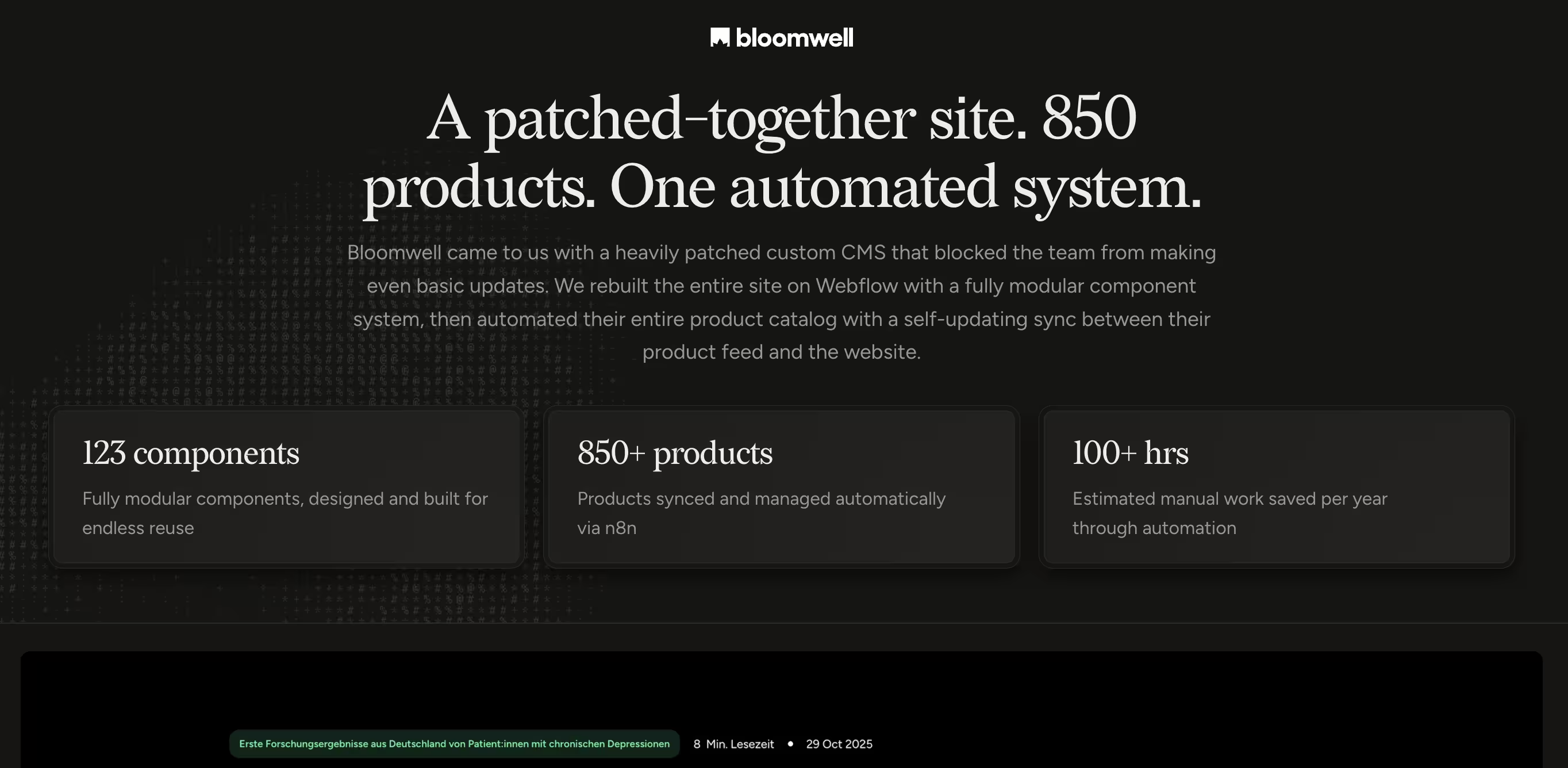
The most relevant case for this article we did is Bloomwell’s Webflow rebuild and automation project. Bloomwell came to Designbase with a heavily patched custom CMS that prevented the team from making basic updates. Designbase migrated the site to Webflow, created a modular component system, and automated a product catalogue containing more than 850 products, saving more than 100 hours annually.
This is a strong legacy CMS example because the motivation was operational, not cosmetic. The problem was not simply that the old site looked dated. The CMS had become a barrier to publishing and maintaining a large, commercially important catalogue. The migration addressed the underlying system: content structure, reusable components, and automation.
The case also shows where Webflow needs to be extended. A standard marketing site can often be managed through Webflow’s native CMS, but 850 products require a reliable data workflow. The important question is not whether a platform has a CMS checkbox, but it’s whether the content model, template, and synchronization process are designed around the volume and change rate of the business.
Other Designbase cases support similar arguments. Crewmeister demonstrates the value of moving from a site with no CMS and heavy developer dependency to a modular Webflow system, while talque shows how Webflow can support a multilingual, 88-page website with structured product, solution, documentation, integration, and case-study content. Instaffo is relevant when discussing scale, landing page governance, and repeated relaunches, although it is more a growth-stage brand-system example than a classic legacy-CMS migration.
What a Safe Migration Includes
A safe migration is a controlled transfer of content, structure, design, and technical signals. It should have a clear owner and a written definition of done.
Discovery and Inventory
Start with a crawl of the current website and an inventory of every important content type. Export URLs, titles, descriptions, headings, status codes, canonicals, indexation directives, internal links, schema, images, and analytics data. Review Google Search Console for queries, clicks, impressions, indexed pages, and ranking changes.
Don’t limit the inventory to pages the team remembers. Include old blog posts, author pages, PDFs, campaign URLs, category archives, media assets, pagination, and URLs receiving external links. A URL with little traffic may still carry authority or support another page through internal linking.
Information Architecture
Decide what should be preserved, merged, removed, or rebuilt. Create a new sitemap and content model before designing every page. Define templates for services, products, articles, case studies, team members, locations, and other recurring types.
This is the point where a migration becomes more than just a copy paste exercise. If the current site has 40 nearly identical service pages, recreating all 40 may preserve the problem. A better structure may use one governed template with clear fields and intentional variations.
Component Architecture
Build a component system that is usable by the team after launch. Components should have clear names, predictable class structures, responsive behavior, accessible states, and documented usage rules. Establish which elements are global, which are page-specific, and which can be edited safely by marketing.
A migration that produces beautiful pages but no maintainable system simply moves the legacy problem into a newer tool. The editor should not be forced to duplicate layouts or change low-level styles to publish content.
Content Migration
Migrate content based on the new model, not the old database fields. Clean outdated content, remove duplicate pages, rewrite weak introductions, compress images, review links, and preserve valuable proof points. For multilingual sites, decide whether translation happens before migration, during population, or after the core templates are approved.
Content readiness is often the biggest timeline risk. A 2023-2026 Broworks industry report covering 55 Webflow migration projects attributed 65% of delays to the client side, which reinforces the need for early ownership of copy, approvals, assets, and translation.
SEO Migration
Create an old-to-new URL map before launch. For every old URL, choose one of four outcomes: preserve the URL, redirect it to the equivalent new page, redirect it to the closest relevant alternative, or return a deliberate 404 or 410 when no useful replacement exists.
Avoid redirecting large groups of unrelated pages to the homepage. Update internal links to point directly to the new URLs. Configure canonical URLs, metadata, robots directives, structured data, and XML sitemap settings. Proper redirect mapping, content representation, SEO metadata, testing, and production-domain verification is all part of it.
Integrations and Consent
Test every form from the published environment. Confirm that submissions enter the correct CRM, attribution fields persist, autoresponders fire, notifications reach the right team, and consent preferences are respected. Review third-party scripts for performance and DACH privacy requirements.
A form that works visually but fails to create a CRM record is a launch blocker. So is an analytics implementation that fires before consent where consent is required. These details should be tested with realistic submissions, not assumed from a successful embed.
Launch and Monitoring
Before DNS changes, crawl the staging site, review representative templates, test mobile layouts, check accessibility, validate schema, and confirm that staging pages are not indexable. Enter redirects before the domain switch and test a sample of old URLs.
After launch, monitor status codes, crawl activity, indexation, rankings, conversions, forms, analytics, and performance. Review the first 7, 14, and 30 days separately. A migration is not finished at the moment DNS points to Webflow - it’s finished when the new system behaves correctly in production.
A Simple Scoring Model
To make the decision less subjective, score the current platform from 1 to 5 across these categories:
Note: A high score in “pain” categories doesn’t automatically mean migrate. Estimate the cost of fixing the current platform and compare it with the cost and risk of a rebuild. If a redesign is already planned, include the cost of rebuilding the old architecture in the “stay” scenario.
The Decision for Mid-Size Teams
For a mid-size marketing team, the most important outcome is usually not a specific CMS feature. It’s dependable operating speed. The team needs to publish without waiting, preserve brand quality, maintain technical standards, and know when an expert is required.
Webflow can be a strong fit when the website is primarily a marketing and communications system: services, products, articles, case studies, resources, landing pages, locations, and proof. For example, it’s especially useful when design quality matters, the team wants more ownership, and engineering capacity is limited.
For B2B and tech companies, this includes websites with more advanced needs: regional pages, integration directories, release notes, documentation, case studies, product comparisons, CRM forms, and campaign landing pages. The platform can support these patterns, but only when the CMS and component architecture are planned rather than improvised.
For established DACH companies, the decision also includes governance, privacy, multilingual content, approval processes, and vendor reliability. A migration partner should be able to explain not only how the new site will look, but how the marketing team will operate it 6 months later.
A Safer Move to Webflow
Switching from a legacy CMS to Webflow is worth considering when the current platform has become a recurring constraint on marketing, performance, governance, or growth. But the decision doesn’t need to be rushed: a structured audit can show whether the existing system should be refactored or replaced entirely.
A successful migration is about more than moving pages or launching a new design. It creates a clearer content structure, reusable components, reliable integrations, preserved SEO foundations, and a website the marketing team can manage with confidence. Bloomwell is a strong example of this approach: Designbase rebuilt the site in Webflow, created a modular system, and automated a catalogue of more than 850 products, saving over 100 hours annually.
You do not need to manage the migration alone or accept unnecessary risk. At Designbase, we specialize in turning complex, outdated, or difficult-to-maintain websites into structured Webflow systems that are easier to operate and improve. We can assess your current CMS, identify the risks, plan the migration, and take responsibility for the technical implementation from the initial audit through to launch and ongoing support.
If your current website is slowing the team down, start with a clear assessment - not a forced platform decision. The right migration plan gives you a realistic scope, protects the valuable parts of your existing website, and creates a more dependable foundation for the next stage of growth.
FAQs
There is no universal winner. Webflow suits design-led marketing sites that need fast publishing, reusable components, managed hosting, and less plugin maintenance. WordPress may be better for high-volume publishing, complex ecommerce, or strong internal engineering teams.
It depends on a couple of factors, like the agency, the industry, the complexity and scope of your site, etc. But overall at Designbase, we rebuild existing websites from €10,000, with most projects costing €12,000 - €22,000 and taking 4 to 6 weeks.
Not if the migration preserves important URLs, content, metadata, internal links, canonicals, and redirects. Traffic loss usually results from missing redirects, deleted pages, indexed staging environments, or major structural changes without a migration plan.
A Webflow technical rebuild typically takes 4 to 6 weeks, depending on the number of pages and templates, CMS complexity, integrations, content readiness, approvals, and SEO requirements.
Yes. Webflow can support multilingual websites, but each language and market needs localized content, SEO settings, legal information, translation workflows, and quality assurance.